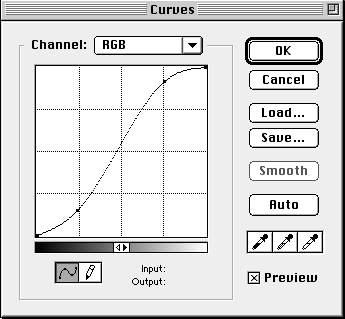
-) Then "Curves" and I used the setting attached to this file. "adobe_curves_GD"
ARCHIVING AGING MANUSCRIPTS
After some trial and error, the following is how I made the archives of the Bengali "Gaudiya Darshan" magazines.
Photograph the pages individually. The paper and binding is too weak to be scanned without incurring damage. Still, some pages are very brittle, so care is needed.
-) Need to be in bright daylight
-) Turn off the flash on the camera
-) Ensure the Camera's on the "Fine" setting that gives 90+ pictures per 128MB card. (In Photoshop the info says: Dimensions = 2048 x 1360 pixels. Resolution = 72 x 72 pixels.) -) I put a cloth on the ground, then laid the magazine flat. Took the photo using a chair as a support to steady my hand (and the camera) and to keep the distant constant. -) Ensure the page is flat using the weight of a flat-file and a finger where necessary; ensure the *lens* is above the *centre* of the page. -) Easiest way is to go all the way through the book doing all the right hand pages, then turn the book and do all the left pages.
PROCESSING the pictures:
-) Crop. Rotate.
-) Then "Curves" and I used the setting
attached to this file. "adobe_curves_GD"
-) Sharpen. (Filter / Sharpen / Sharpen)
-) "Save As..." a jpeg file at quality of "5" or Medium. (No need to save with Icons or Previws.)
-) For simplicity I saved them at first only by the page number.
-) Absolutely confirm the page number is correct. Refer to the physical book to be sure. Double check.
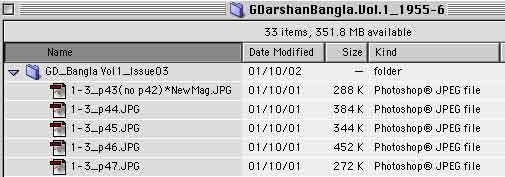
-) Finally, using DiskTop or FileBuddy, change the file names to follow the pattern: Folders: GD_Bangla Vol1_Issue06
Files: 1-6_p107.JPG
i.e.
----------------------------------------------------
Corrections or suggestions to improve the quality of the Archives are of course welcome.
-Mdbr
14 October 2001