All glories to Sri Guru and Sri Gauranga
In-house Office Tips
SCSMath, Nabadwip.
slightly updated 26 April 2004
Searching in 'Folio
The method to find
diacritic words, etc. in non-Iskcon folios. (Given by Gauranidhi Prabhu,
22 April 2004)
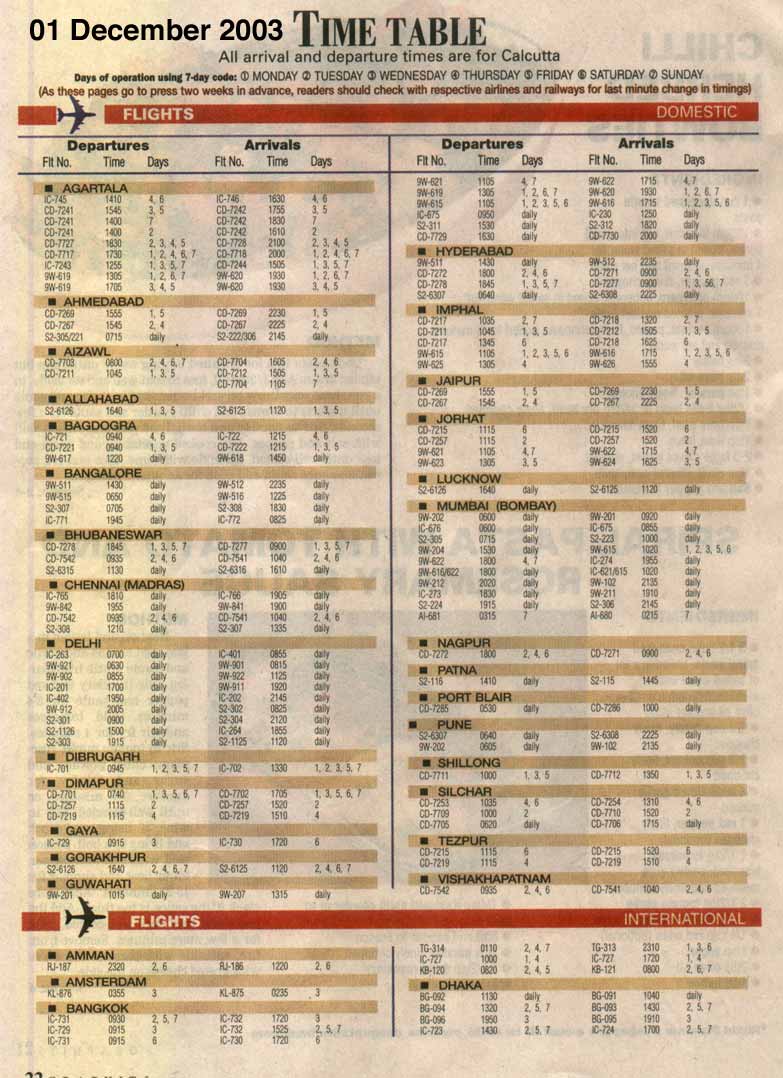
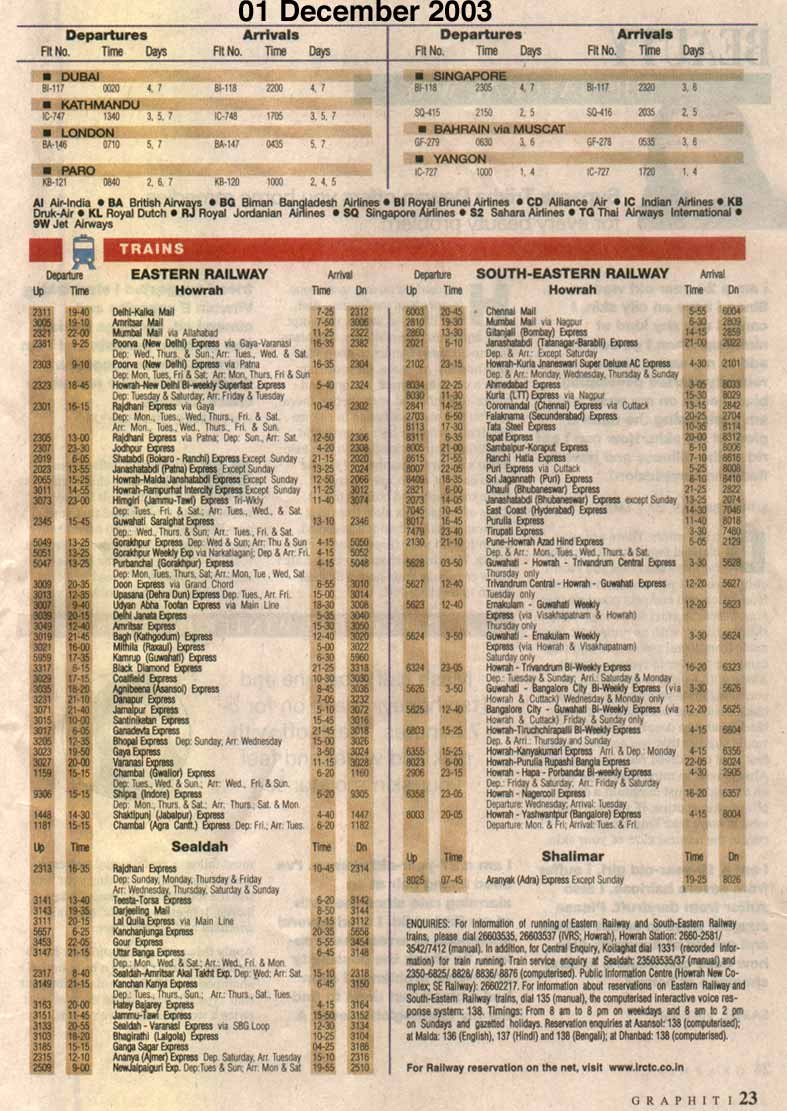
Train and plane timetable for Calcutta:
Timetable from newspaper as of 03 December 2003
-) Part one and
-) Part Two = rest
of the planes, and all the trains
Web Mail for scsmath.org account users:
If need to check an scsmath.org email account using Web Mail, replace the
word 'login' in the following address with your own login name: http://scsmath.org:2095/login+scsmath.org/neomail.pl
For the main account, delete 'login+' and as the above URL
"Essential" applications I'm using on the PC:
- ftp:
WS_FTP95.exe
- for converting documents to html, first save as 'rtf' format, then
drop onto:
Arachonphilia 4.0
- and for making/adjusting web-pages:
The Free HTML Editor
- secure telnet access:
putty.exe
- Picture editing, and saving as jpeg, etc. (it's shareware):
Paint Shop Pro
Linux and Unix commands
- linux_commands.html
- summary-commands.html
- unix-bas.html
- At least:
du [directoryname] gives the size of directory and all within it.
du -sb directoryname gives just the directory size.
hence du -sb * gives the sizes of the folders only.
mv -r direcoryname newlocation moves a whole directory. That '-r' is
important otherwise it only wants to move a file.
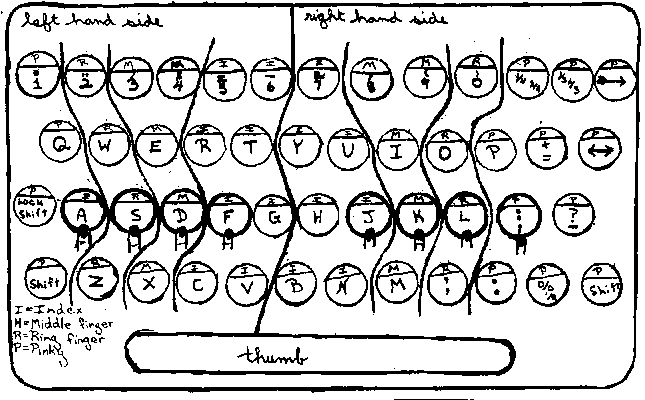
Learning to type?
At least put your fingers in the right places on the keyboard, then type
away for service. Yes, a bit difficult at first, but soon your brain connects
channels to all 10 fingers ... and you'll be typing fast in no time! See
the finger chart.
SOUND -- AUDIO:
WEB-PAGES
VIDEOS (RealPlayer are best for
the Web) and: SLIDES (QuickTime
is best) with or without commentary.
- Camera care:
- Don't wipe the lens, only blow the dust off or
use a camel hair brush
- Don't point it into the sun or towards brightly
reflecting obejects. There's a different kind of sensor behind the lens
that burns easily. (Sripad Parvat Maharaj burned his twice. So be warned.)
- FIRST: Shooting and Importing from the camera. Take good
note: Final Cut Pro uses a 'Timecode'. WHILE SHOOTING take care not to break
the timecode on the camera. It breaks if there is any gap between one
shot and another. Safest is not to show anyone your shots half way through
or to take the tape out of the camera! Otherwise be SURE to make a note the
lieklyiood of a timecode break at that location, or start shooting again from
TWO SECONDS or more BEFORE THE END of your current shooting.
If you're importing a project with broken timelines DON'T do it in
Final Cut (unless u want to guess where the whole hit-and-miss affair of guessing
where the breaks are. Instead : Import into iMovie. Then drag those Clips
into the Timeline of a blank FinalCut project. Export the sound as 48 Khz
AIF (I used mono, to save time, and doubled it up later,). Then turn off the
sound for the two sound tracks, and export the video as DV stream PAL. Delete
all the clips from the timeline and from the disc. Now imprt your DV stream
Video. De-link the dv inherent audio and delete that audio. Then insert the
generated .aif audio and link with the video. Wheww. Now u see why it's better
not to break the timecodes! DV streams don't have timecodes (nor does iMovie)
hence the need for this procedure.
- Plan A(!)- mpeg files that work on any PC or
MAC and can be readily made into Taost Video CD too (for use on home video
cd players common in India): As of 16 November 2002 setup: Import files
from camera into FinalCut Pro 2, then do everything. Finally, export as
FinalCut Movie 'Current Settings' then open in FinalCut Pro 1.O and immediately
Export as Toast CD.
- Plan A - Copying back to Camera (only currently possible
via iMovie): Import and process in Final Cut Pro 2.0, then Export
as QuickTime DV Stream PAL Then make a New movie in iMovie. Close it.
Drop the Video Streem into the 'Media' folder assocaited with the new
iMovie movie sequence. BUT iMovie handles ONLY UP TO 6 mins 30 sec
in one clip (therefore safer to keep it to 6 mins), therefore chop
the dv stream into pieces using QuickTime Pro. Incidentally 3 minutes
of .dv stream = 650MB, so can be stored on a CD). Then open that iMovie
Sequence, and it will automatically put this file (or these files) onto
the pasteboard. Option-Drag them to the timeline. Export to Camera.
- As of April 2004, trying to improve the quality of web
videos, this worked quite well: The best VIDEOS for the WEB
are produced with FinalCut Pro then exported to the web picture size (244
x 188) using Motion jpegA or B: 25 frames per second, BEST quality. Then converted
in RealProducer using the Corporate LAN setting. This makes it slighly
over 1MB per minute, but much better quality than previos method (gen below).
The free RealProducer doesn't give you any chance to change several settings
including the size and the frame rate, it simply uses what's given to it.
- PREVIOUSLY followed this method, but the quality is
really a bit too poor: and frame rate (10), then processed with RealProducer
as 'single ISDN'.
- BUT SLIDES:,
iMovie only handles files 768 x 576 pixels, and it's found that SLIDES are
better processed in Photoshop, adusted to the size of the slide-show (I found
350 x 270 to be a good size) and sharpened and saved as pict files, then added
to the timeline of Final Cut Pro. Export at 0.2 frames per second (i,e, one
frame each 5 seconds)and export at full quality.
Then, in MediaCleanerPro, save it as a as jpeg quality 20%, using Qualcom
PureVoice 8 khz Full Rate for sound reduction, experiment to make the sound
LOUD(!). DON'T compress Video header, otherwise you'll limit your audience
(including our BigMac). DON'T 'Maintian Long Frames' or you'll increasse
the size by 50% for nothing.
- ntsc dv stream to pal: import into browser
then sequence of a Final Cut Pro timelinne. Double click it in the timeline.
Motion: Scale to 120% and Aspect Ratio = 0 (it isn't when u import it!).
- DVD: in System X. Toast 6 can expert DVD files as DV stream.
And Toast 6, if you make a DVD but without adding the Data files (there's
an option in the 'Advanced' section, then it will play files consecutively
and continuously. It doesn't take any time at all to process an already existing
DVD video file, BUT it didn't seem to want to Export just a selected part
of DVD file. Hence may need to first make a Disk Image DVD of the part you
want to export, then use that.
Taking a big file from an internet beareau:
- Taking more than a floppy holds from a Cyber Cafe PC can be a hassle.
So here it is a tiny DOS prog (2K!) to slice files onto floppies. It's
called Slice.
Download it and put it in the
"Windows" diretory on a PC. Run it using MS-DOS Prompt: Start/Programmes/MS-DOS
Prompt. Navigate to the directory and locaton of the big file to be 'sliced'.
Be careful to ensure the source file has a super-short file name. It's
usage:
format: SLICE [s:\path\]filename[.ext] d:
where: s:\path\filename.ext is the file to SLICE.
d: is a removable media drive.
- Also the little programme (1.3K) to put the sections back together
on a PC: Splice.
- Added those super useful: pkzip
and pkunzip. They're self-explanatory
and, as with Slice, are run using the MS-DOS Prompt. Remember you can only
use 8 letters then a period and max of three letters afterwards —
this applies to the original file name as well as the file name you make.
- And, in case needed in one of those pesky internet cafes: telnet.exe and ftp.exe.
And two tutorials on ftp to remind us how to use the raw ftp codes: ftp_tutorial.html and ftp_manual.html. (FTP: type
'prompt' to turn off y/n when using mget and mput)
Splitting files on the Mac:
- Use Stuffit, and the command 'Segement'.
VSNL info, roaming in India, and phone numbers:
- This file
was taken from the Web 10 January 2002, Includes also vsnl's advised modem
settings, etc. TCP/IP settings and cost of their accounts.
Using the digital CAMERA
- -) The Nikon digital camera.
- Ensure the Quality is on: "XGA FINE" it takes
about 300 full-screen pictures in this mode using the 128MB card.
- In general use it on "A" on the top dial =
automatic. At night the flash has a SHORT range.
- Remember always to ensure Red Eye reduction is ON.
Keeping track of pictures.
- -) Use the programme "iView Multimedia" (or as named
in earlier versions: "PhotoRelay") -- programme that come with
"Toast". It allows the most versatility.
- Arrange, orientate, rename, and keep an organised record of photos.
Now we are able to burn CDs then organise the files and folders with a
view to making Slide-Show CDs for distribution -- at the same time it autmotically
keeps the pictures archived.
- Be Careful: Uisng iView if you move the folder, or any part of the
path is re-named, it is necessary to go to Tools / Reset Path so it now
knows where the pictures are. Only then will it allow you to re-name files,
move them, etc. Othwerwise it may be antisocial and simply forget everything....
Be careful to use only Process the folders/files only on a Mac disc, keep
a copy, then rename the files using the Tools / Rename command, only use
PC regular characters in naming files. Make captions on the pictures using
Photoshop.
- Using an iView catalog on a PC disc or partition seems to confuse the
file names and the catalog may lose its Creator and Type.
Archiving Old Manuscripts
Office--How to find useful places in Calcutta, etc.
Applications. Some tips:
- Quicken, the basics:
The basics:
Go to Lists/AccountsFor summaries of total expenses, or expenses in a particular
period of time, particular category ("How much spent on cows this month?"
etc) then:
Activities/Reports&Graphs/Reports
Then double-click "Cash Flow"
Voila :-)-) This is the maps, and "how
to get to folder" on the office Macs
Extras: mdbr